
UT Bot Suite for TradingView
Beyond the original UT Bot.
Scan up to 40 markets, customize your trailing stops, configure entries and exits, and backtest your strategies directly on TradingView. Two premium tools built around the UT Bot methodology you already know.
Two premium tools. One subscription. Available directly through TradingView. Explore the tools
- Billing handled by TradingView
- Linked to your TradingView account
- No extra trading software
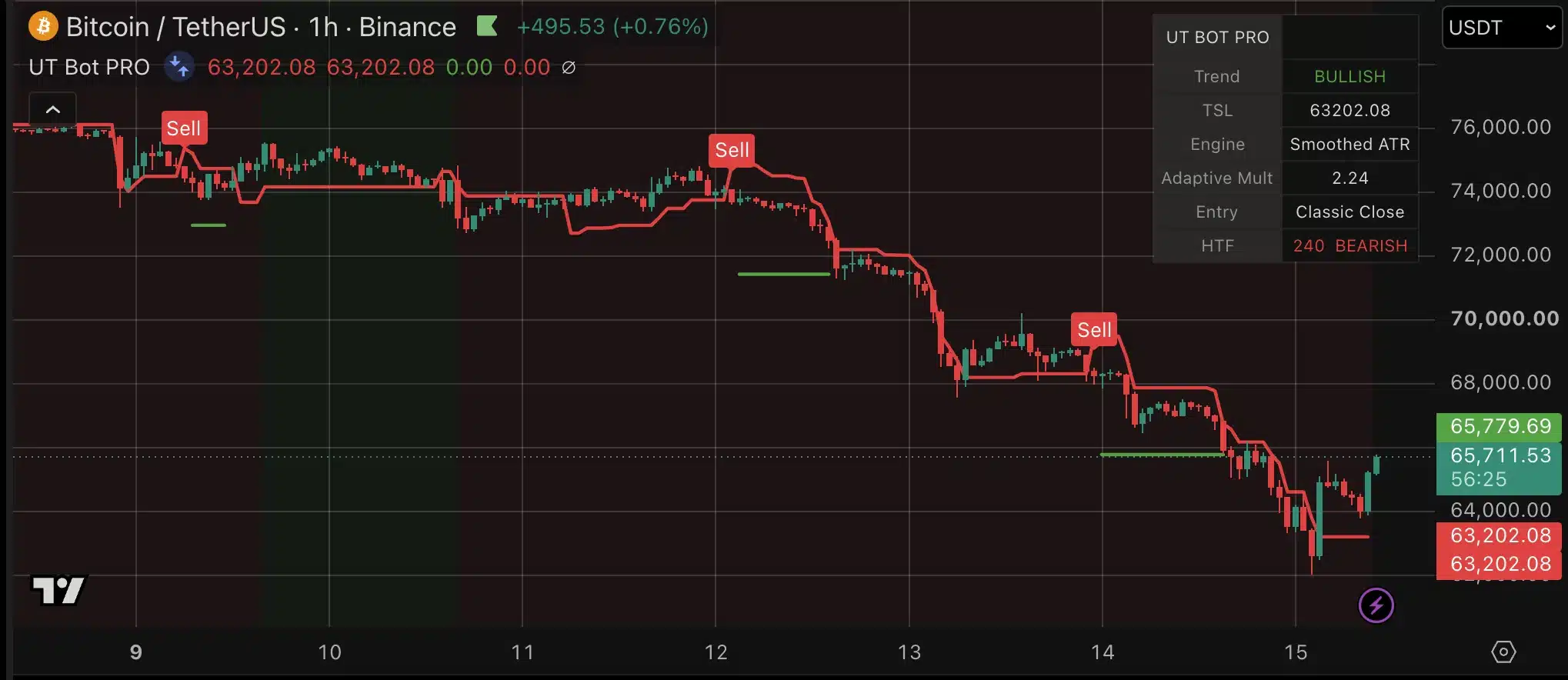
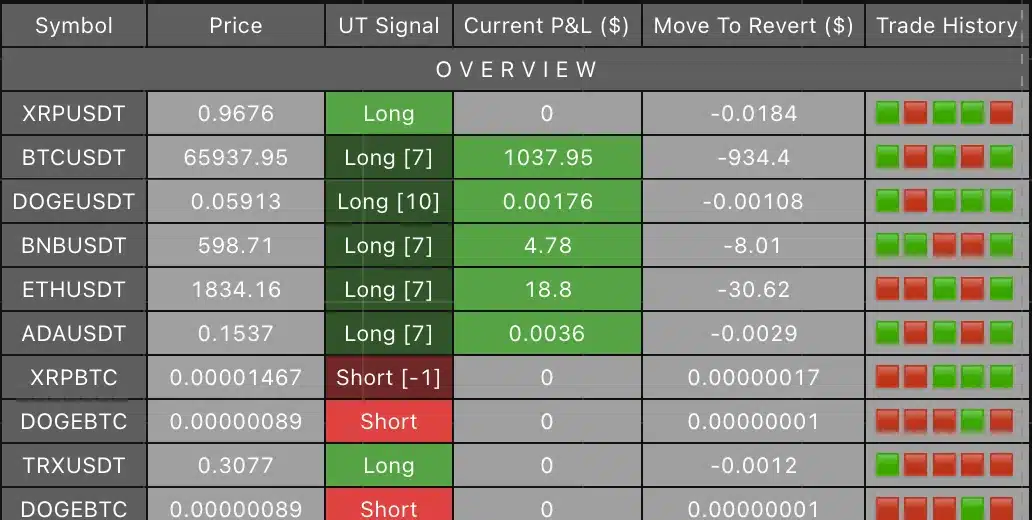
Built on a methodology traders already know.
The original UT Bot is a widely used ATR trailing-stop indicator on TradingView. UT Bot Suite extends its core methodology for screening, trade management, and strategy research.
UT Bot was originally developed by @Yo_adriiiiaan, based on an idea by @HPotter. QuantNomad published UT Bot Alerts in 2020 and maintains the free, open-source UT Bot v2. Figures from TradingView, November 2026.
1.7M+
views on UT Bot Alerts, QuantNomad’s UT Bot script
175K+
followers of QuantNomad on TradingView
2020
the year QuantNomad published UT Bot Alerts
2
premium tools in one subscription
The tools
Meet the UT Bot Suite
Two invite-only TradingView scripts: one to research a single chart in depth, one to monitor many markets at once.
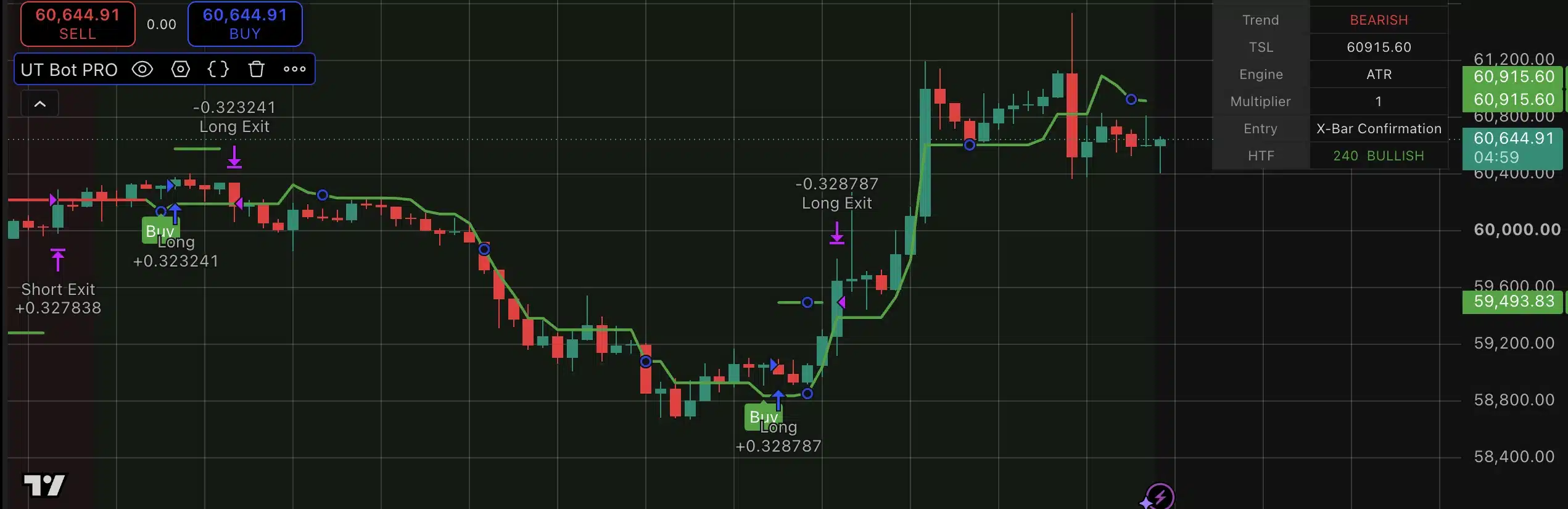
Strategy · Invite-only
UT Bot Pro
Advanced Trailing Stop Framework
Control how UT Bot calculates its stop, confirms entries, and exits, then test each configuration in the Strategy Tester.
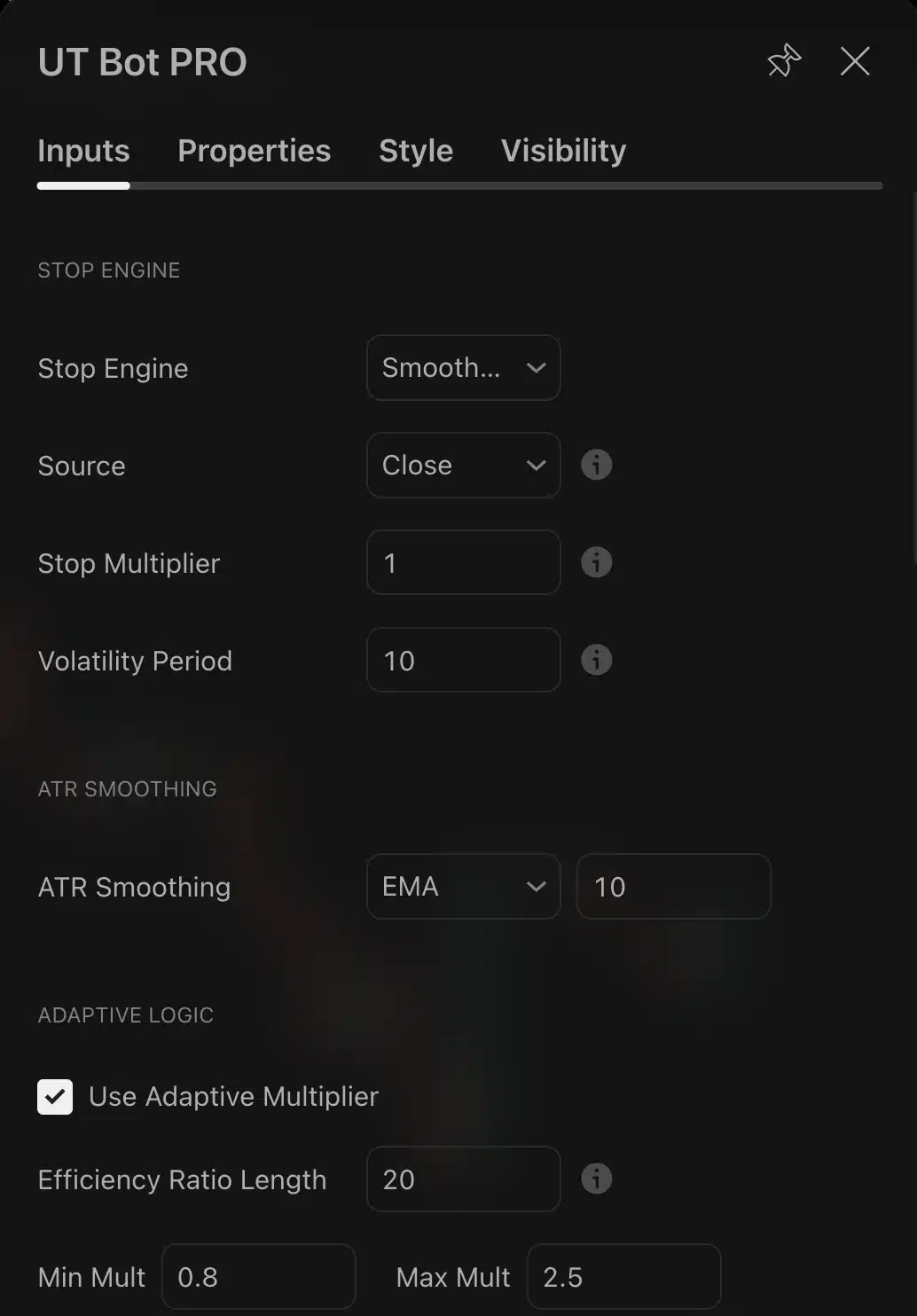
- Four trailing-stop engines and an adaptive multiplier
- Four entry modes and higher-timeframe confirmation
- Three exit modes, including risk/reward targets
- Backtesting with a configurable date range
- Status dashboard and TradingView alerts
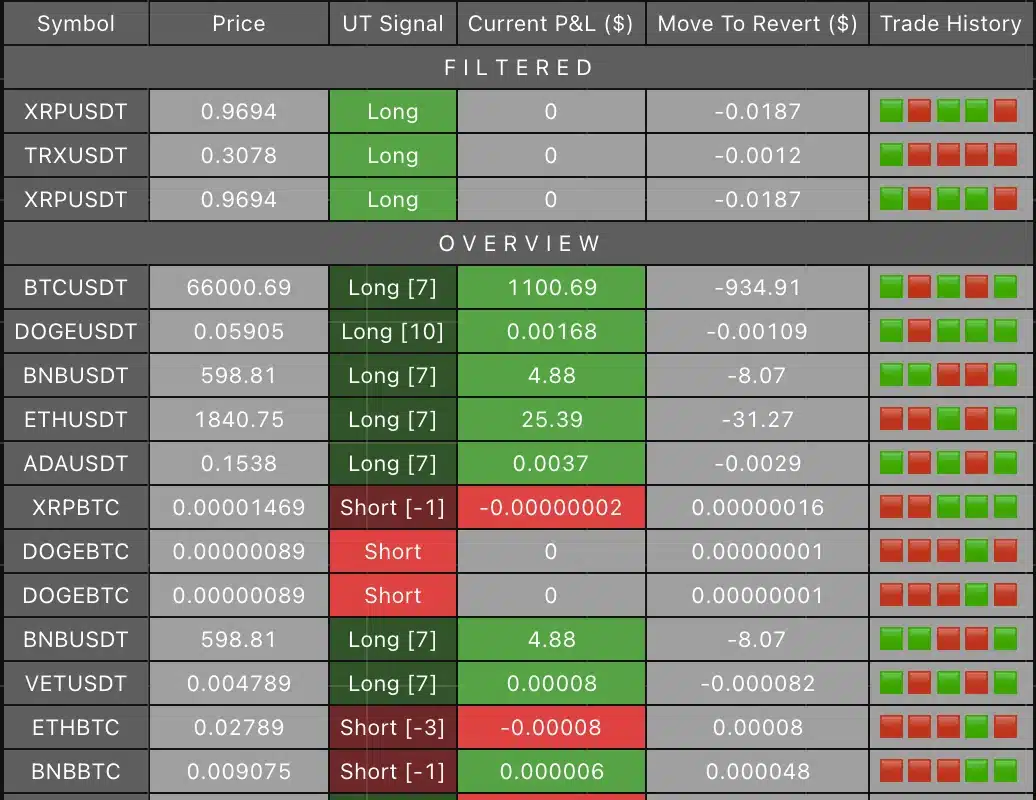
Indicator · Invite-only
Ultimate UT Bot Screener
Multi-Market Trend Monitoring
The UT Bot state, open P&L, and trade history of up to 40 instruments in one table.
- Up to 40 symbols on your chart’s timeframe
- 13 data columns, including Move To Revert and Trade History
- Column filters and sorting to surface relevant setups
- Alerts that list the symbols passing your filters
How the tools work together
One methodology. A connected workflow.
-
01
Discover
UT Bot Screener
Monitor multiple markets and spot relevant UT Bot conditions.
-
02
Analyze
UT Bot Pro
Open the chart and study the trend in detail.
-
03
Configure
UT Bot Pro
Adjust stops, entry confirmation, higher-timeframe context, and exits.
-
04
Evaluate
TradingView Strategy Tester
Research how the configuration behaved historically.
The two scripts run independently. The Screener has its own UT Bot inputs and does not read UT Bot Pro’s settings, so set both consistently when you use them together.
Inside UT Bot Pro
Go beyond the classic ATR trailing stop.
Every part of the UT Bot logic becomes a setting you can test. The defaults match the classic approach.
Stop engines
ATR, Smoothed ATR, Standard Deviation, or Historical Volatility.
Adaptive multiplier
The stop distance moves between a minimum and maximum, based on how efficiently price is trending.
Entry modes
Classic Close, Close + Buffer, X-Bar Confirmation, or Touch / Stop Order.
Higher-timeframe filter
Only take entries that agree with the UT Bot state calculated on a higher timeframe.
Exit modes
Opposite signal, trailing-stop exit, or a risk/reward profit target.
Strategy research
Compare configurations in the Strategy Tester over a date range you choose.
Free UT Bot v2 vs. UT Bot Suite
The original methodology. More possibilities.
The free UT Bot v2 is a complete, open-source tool for the classic approach. The Suite adds capabilities, not guaranteed better results.
| Feature | Free UT Bot v2 | UT Bot Suite |
|---|---|---|
| Best for | Traders who prefer the classic ATR trailing-stop methodology | Traders who want advanced configuration, market screening, and strategy research |
| Classic ATR trailing stop | Included | Included |
| Buy/sell signals and alerts | Included | Included |
| Strategy backtesting | Included | Included |
| Alternative volatility models | — | Included |
| Adaptive multiplier | — | Included |
| Advanced entry methods | — | Included |
| Configurable exits | Opposite signal | Included |
| Higher-timeframe confirmation | — | Included |
| Multi-market screening | — | Up to 40 symbols |
| Source code | Open source | Closed source |
| Price | Free | $9.99/month |
More control. Not more promises.
UT Bot Suite is built for traders who want to understand, customize, and research their trading methodology.
Rather than promising better signals, the Suite focuses on volatility, trend following, trailing stops, entry confirmation, and trade management.
Every configuration involves trade-offs. The tools give you the flexibility to explore them.
Pricing
Two premium tools. One simple subscription.
UT Bot Suite
$9.99 / month
Everything you need to take UT Bot beyond its classic configuration.
- UT Bot Pro — Advanced Trailing Stop Framework
- Ultimate UT Bot Screener — up to 40 symbols
- Advanced trend analysis and strategy backtesting
- TradingView alerts, including webhook messages
- Updates to both scripts, delivered on TradingView
- Complete product documentation
Payment and subscription management through TradingView.
Want to try it first?
-
Subscribe on TradingView
Sign in on the UT Bot Suite Paid Space and click Subscribe. TradingView handles checkout.
-
Access is added to your account
Both scripts are linked to the TradingView account you subscribed with. No separate form.
-
Add the tools to your chart
Open them from Favorites or the Invite-only scripts tab. See the installation guide.
Documentation
Understand every setting.
Every engine, setting, and alert is documented, with worked chart examples.
Getting started
Subscribing, installing, and first configuration.
UT Bot Pro
Engines, settings, signals, alerts, and examples.
UT Bot Screener
Symbols, columns, filtering, and alerts.
Changelog
Release notes for both scripts.

Built by QuantNomad.
UT Bot Suite is developed and maintained by QuantNomad, the publisher of UT Bot Alerts (1.7M+ views on TradingView) and the open-source UT Bot v2.
QuantNomad is run by Vadim, a software developer from Switzerland with over 15 years of experience, who has focused on quantitative trading and Pine Script tools since 2015.
FAQ
Frequently asked questions
What is included in UT Bot Suite?
Two invite-only TradingView scripts: UT Bot Pro (a strategy) and Ultimate UT Bot Screener (an indicator), for $9.99/month.
How is it different from the free UT Bot?
The free UT Bot v2 implements the classic ATR trailing stop. UT Bot Pro keeps that core, and its defaults follow the classic approach, but every part is configurable: see the comparison. The Screener applies UT Bot across up to 40 symbols.
How do the two tools complement each other?
The Screener finds UT Bot conditions across many markets; UT Bot Pro analyzes, manages, and backtests them on one chart. They run independently, so keep their UT Bot inputs consistent.
How do I subscribe?
Open the TradingView Paid Space, sign in, and click Subscribe. Access is linked to that TradingView account on any device. See Getting Access.
How do I request a free trial?
Fill in the trial request form.
Do I need a paid TradingView account?
Not to use the scripts. Webhook alerts, the number of active alerts, and indicators per chart depend on your TradingView plan.
How do I manage or cancel my subscription?
In your TradingView account settings (see TradingView’s Paid Spaces help). TradingView processes payments, so contact TradingView support about refunds.
Can I backtest my configurations?
Yes. UT Bot Pro is a TradingView strategy, so any configuration can be tested in the Strategy Tester. Backtests are research, not predictions: results depend on symbol, timeframe, market regime, settings, and your commission and slippage assumptions.
Are alerts supported?
Yes. UT Bot Pro alerts on Buy/Sell signals, and its order fill alerts support custom JSON for webhooks. The Screener sends the symbols passing your filters at each bar close.
Do the tools repaint?
It depends on the setting, so we make no blanket claim. UT Bot Pro’s close-based entry modes confirm signals at the bar close; Touch / Stop Order entries can trigger intrabar. Screener columns that describe the still-forming bar, such as Move To Revert, update until it closes.
Does UT Bot Suite guarantee profitable trading?
No. It provides configurable tools for analysis and strategy research. It does not predict prices or guarantee trading performance.
Take UT Bot further.
Explore a more flexible approach to trend following, market screening, and strategy research — directly on TradingView.
Two premium tools. One subscription. Built by QuantNomad.
Disclaimer: UT Bot Suite is provided for informational, analytical, and educational purposes. It does not constitute financial or investment advice. Trading involves risk, and historical performance does not guarantee future results. Read the full risk disclaimer and our privacy policy.